
Contents
General notes about the labs
Often the lab instructions are intentionally open-ended, and you will have to figure some things out for yourselves. This module is designed to be challenging, as well as fun!
However, we aim to provide a well planned and fluent experience. If you notice any mistakes in the lab instructions or you feel some important information is missing, please let us know and we will try to address any issues.
Preparation
Action: For all of the labs in this module, start by logging into Hacktivity.
Click here for a guide to using Hacktivity. This includes some important information about how to use the lab environment and how to troubleshoot during lab exercises. If you haven’t already, have a read through.
Action: Make sure you are signed up to the module, claim a set of VMs for the web environment, and start your Kali VM.
Feel free to read ahead while the VM is starting.
==VM: Interact with the Kali VM==. ==action: Login with username “kali”, password “kali”==.
Introduction to the approach to lab activities for this module
This module makes use of these great learning resources (amongst others):
- Damn Vulnerable Web App (DVWA): a vulnerable website (written in PHP)
- OWASP WebGoat and WebWolf: an interactive teaching environment for web application security (written in Java)
- OWASP Security Shepherd: a CTF style set of challenges, with some additional training built-in (written in Java)
These lab sheets will guide you through your use of the above and also introduce some important fundamental concepts and techniques.
Understanding cookies
A cookie is a small piece of data sent by the server when you request a web page and stored in your machine by your browser. Cookies were designed so websites could keep track of state, thus enabling more complex interactions such as, for example, adding different items to a shopping cart, or browsing to different parts of a website without having to authenticate multiple times. It is thanks to cookies that websites “remember” who you are and what you were doing when you last visited them.
The simplest cookie
We are going to create a very simple page which uses PHP to get a parameter called “my_cookie”, passed as a query string, and sets the value of the “my_cookie” cookie.
==action: Open a terminal and type the command below to create a file called cookie.php==.
vi cookie.php
Vi is a powerful text editor available on most Linux systems. Vi is ‘modal’: it has an insert mode, where you can type text into the file, and normal mode, where what you type is interpreted as commands. ==action: Press the “i” key to enter “insert mode”==. ==action: Type your changes to the file, then exit back to “normal mode” by pressing the Esc key==. Now to ==action: exit and save the file press the “:” key, followed by “wq” (write quit), and press Enter==.
==action: Enter and save this content (Ctrl + Shift + V to paste):==
<?php
$cookie_value = $_GET["my_cookie"];
setcookie("my_cookie", $cookie_value, time() + (86400 * 30), "/");
?>
<html>
<body>
<?php
echo "Cookie value is: " . $_COOKIE["my_cookie"];
?>
</body>
</html>
==action: Self-host this PHP, using the PHP built-in webserver:==
php -S 127.0.0.1:8075
Note: 127.0.0.1 is the IPv4 loopback address for localhost (it connects back to the same computer, locally). We need to tell the PHP built-in-webserver to listen on a specific IP address.
==action: From Firefox visit:==
http://localhost:8075/cookie.php?my_cookie=NomNomNom
You should see a dynamic page load, but the cookie has not been set yet.
==action: Press F5 to refresh==.
You should now see the cookie value appear on the page.
Question: Why was the cookie value not set the first time you loaded the page?
==action: Experiment with changing the value of the my_cookie parameter in the browser==.
==action: Close Firefox, but Leave the PHP server running==.
Using a local Web proxy to view cookies
You can use OWASP Zap to view Set_Cookie requests sent by the server to the client, as well as cookies stored in the client that are sent back to the server.
==action: Start OWASP Zap== (“Applications” menu, “03 - Web Application Analysis”, “owasp-zap”).
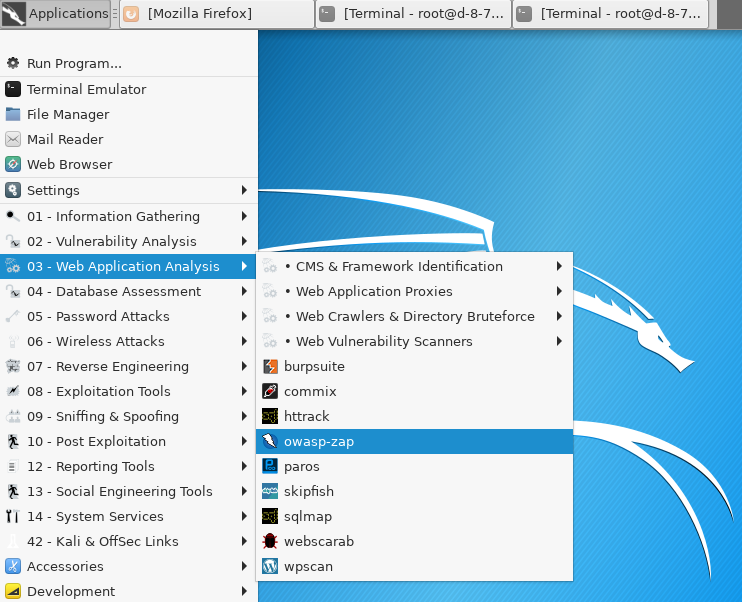 Starting OWASP Zap
==action: Accept the license and wait for the proxy to start==. ==action: Select, “No, I do not want to persist this session at this moment in time”== and ==action: Click “Start”==.
Remember you can get help by pressing F1.
==action: Click on the Firefox icon to open an instance of the browser pre-configured to work with Zap==.
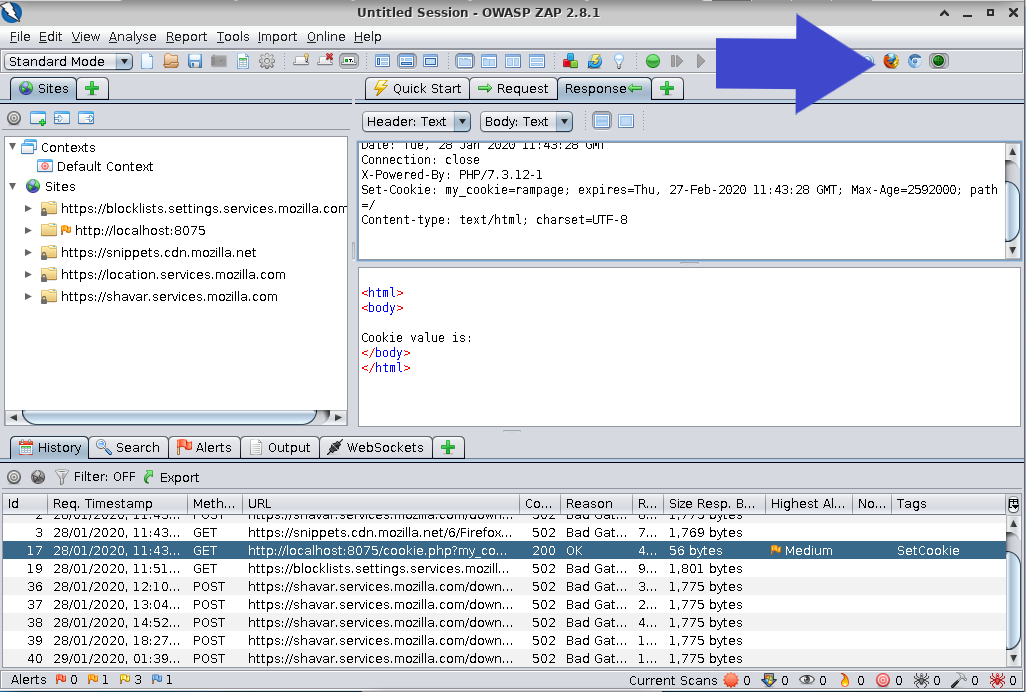 Firefox icon in ZAP
==action: Wait for the browser to open and navigate to==
http://localhost:8075/cookie.php?my_cookie=chocchips
If prompted to take the HUD tutorial again, ==action: select “Continue to target”==.
==action: After the page has loaded, find the GET request in Zap and look at the response tab==.
Question: Can you see a Set-Cookie header sent by the server to the browser?
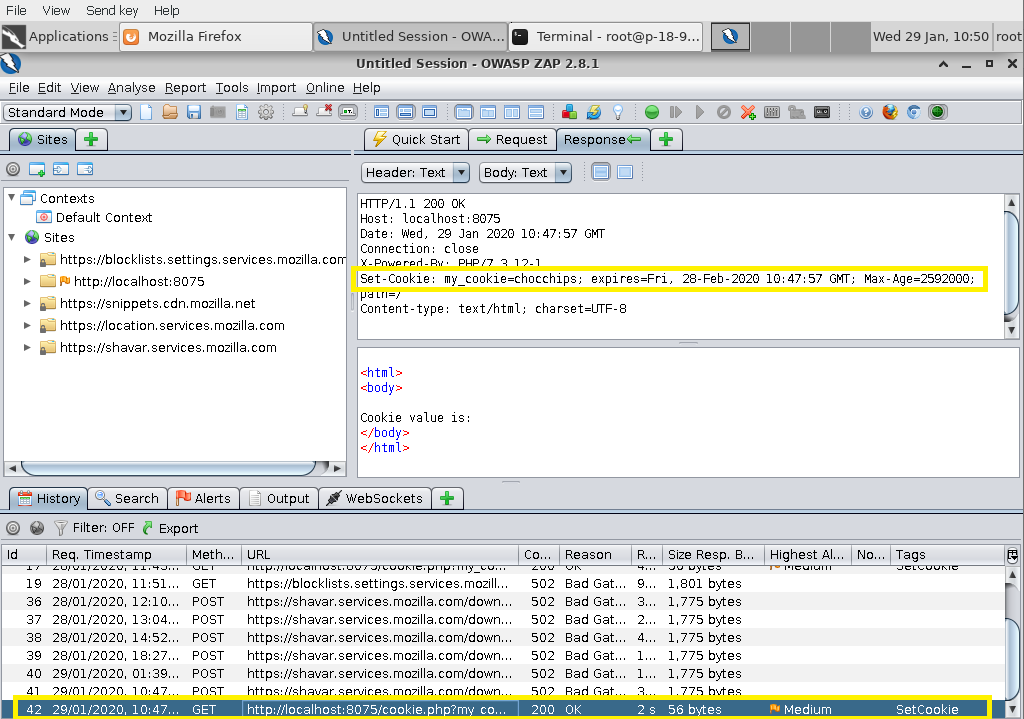 Set-Cookie header in ZAP response
==action: Select the request tab==.
Question: Are there any cookies sent by the browser to the server? Is my_cookie set to the value you expected?
==action: Refresh the page in Firefox and select the new GET request from the History tab at the bottom==.
==action: Look at the request and response tabs again==.
Question: Did the browser send the cookie to the server with the value you expected?
==action: Refresh a few more times and confirm that your cookie is being included with every request==. Your browser will keep sending the cookie every time it requests a page from the same server, until the cookie expires.
==action: Open another tab and navigate to==
http://localhost/login.php
==action: In Zap, look at the request sent by the browser==.
Question: Was the cookie included in the request?
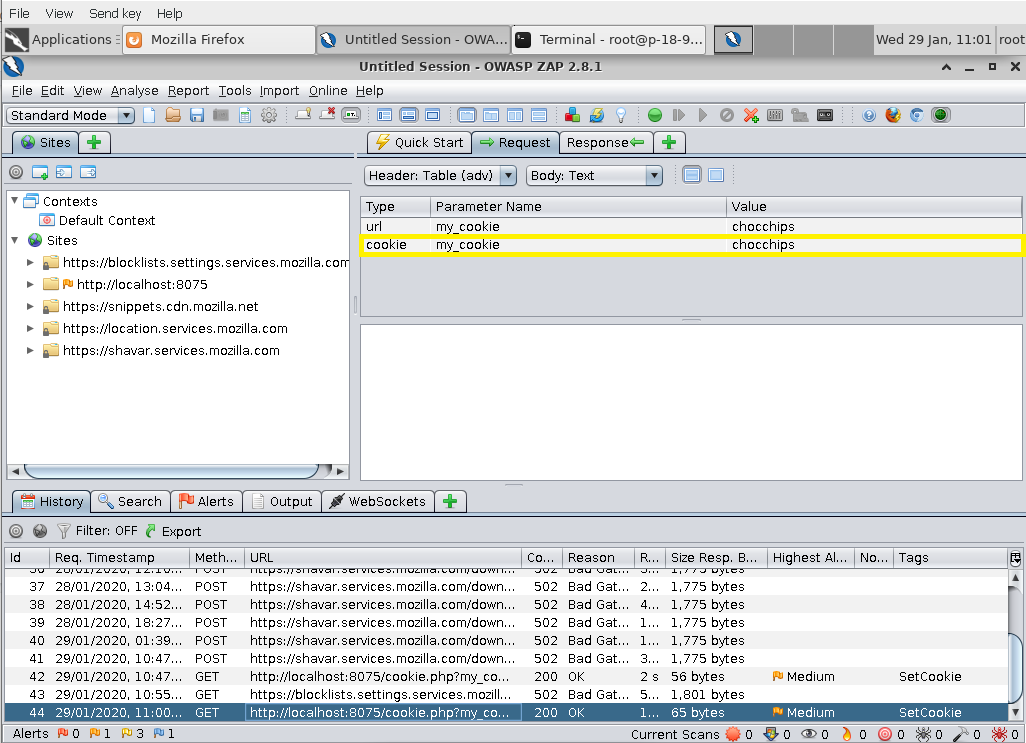 Cookie in request headers
It is important that you have a good understanding of the interaction between the client (your browser) and the server at this stage. This sets the foundation for a number of more complex attacks which are covered later in the course, such as cross-site scripting and cross-site request forgery.
Session cookies
Session cookies are temporary cookies used to identify user interactions with a Web application that take place within a window of time. They are stored in the browser’s memory and deleted when the user closes the browser.
We are going to write a very simple PHP page that sets a session cookie. We are then going to use Zap to intercept the communication between the client and the server so we can understand the exchanges that happen.
==action: Open a terminal and type the command below to create a file called session.php==.
vi session.php
==action: Press the “i” key to enter “insert mode”==.
==action: Enter and save this content (Ctrl + Shift + V to paste):==
<?php
session_start();
?>
<!DOCTYPE html>
<html>
<body>
<?php
echo "Session cookie value is: " . $_COOKIE["PHPSESSID"];
?>
</body>
</html>
==action: Exit back to “normal mode” by pressing the Esc key==. Now, to ==action: exit and save the file, press the “:” key, followed by “wq” (write quit), and press Enter==.
If your PHP server is no longer running, ==action: start it again by typing:==
php -S 127.0.0.1:8075
==action: Close Firefox completely (all windows), then open a new instance of Firefox from Zap to ensure you have cleared all session cookies and are hooked up to the proxy==.
==action: From Firefox visit:==
http://localhost:8075/session.php
You should see the page load.
==action: Press F5 a few times to refresh==.
==action: Look at the GET requests in Zap==.
Question: Does the session cookie change when you refresh the page?
==action: Close the browser and open it again from Zap==. ==action: Press F5 to refresh==.
Question: Did you get the same session id from before? Why not?
==action: Go to your terminal and press Ctrl + C to stop the PHP server==.
DVWA challenges
Damn Vulnerable Web App (DVWA) is a web application written in PHP, with a MySQL database. It is vulnerable by design, and used by security professionals and web developers to learn about web application vulnerabilities and how to exploit them.
The instance of DVWA you will be interacting with is installed locally in your Kali.
For this part of the lab, you will need your Zap proxy open and a browser window that is hooked up to work with it.
==action: In Firefox, close all tabs apart from the one you are using==.
==action: Navigate to==
http://localhost/
This is where DVWA is located, ==action: log in using the default credentials: admin/password==.
Note: You may need to restart the database, open a terminal and type sudo service mariadb start - the password is kali. You should then be able to login with admin/password.
Low Security Level
DVWA has four different security levels: low, medium, high and impossible. ==action: Select “DVWA Security” from the left-hand side menu and read the information about what the different security levels mean==. ==action: Ensure “low” is selected==.
==action: Select “Weak Session IDs” from the left-hand side menu==.
==action: Click on the “Generate” button a few times==.
==action: In Zap, find the POST requests generated by the button and look at the session cookies generated to keep track of the session (dvwaSession)==.
Question: Can you see any problems with the way this web application generates its session IDs?
Question: How could a malicious attacker exploit this vulnerability?
Medium Security Level
==action: Select “DVWA Security” from the left-hand side menu and change the security level to “medium”==.
==action: Go back to the “Weak Session IDs” page and click on the “Generate” button a few times==.
==action: In Zap, find the POST requests generated and look at the dvwaSession cookies==. They are not purely sequential anymore, but there may be a pattern to them. ==hint: Can you guess what it is?==
==action: Click on the “View Source” button to look at the server-side code that is generating the session ids==.
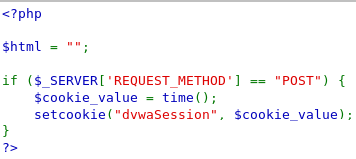 DVWA source code for session ID generation
Note: The code above sets the session to the current time (in seconds). ==hint: How could a malicious attacker use this information to guess a user’s session id?==
High Security Level
==action: Select DVWA Security from the left-hand side menu and change the security level to “high”==.
==action: Go back to the “Weak Session IDs” page and click on the “Generate” button a few times==.
==action: In Zap, find the POST requests generated and look at the dvwaSession cookies==. The values assigned to this cookie appear to be random now. The fact that the string contains 32 characters could lead you to suspect it has been hashed using the MD5 algorithm. Hashing, however, is not encryption and, technically, cannot be directly reversed.
Question: How would you attempt to unhash the string?
==action: You could try an online database==. If the string is a dictionary word or simple number combination, chances are the MD5 hash for it is known and can be looked up. ==action: Search for an MD5 lookup database outside of your Kali VM and look up the dvwaSession hashes generated==.
Question: What did they resolve to? Would you say the approach used to generate session ids in this case is secure?
Log into Security Shepherd and work through assessed tasks
Flag: For this week, complete the lesson and challenges for:
- (Broken) Session Management (only the first 5 challenges)
- Poor Data Validation
Session Management Tips
Hint: You may want to use Zap’s built-in decoder (Ctrl + E) to complete some of the “Session Management” challenges.
Hint: Some of the challenges will require you to devise a brute-force attack using the Fuzzer. Make sure you are familiar with creating payloads and using payload processors. A list of built-in payload processors available in Zap can be found here: https://www.zaproxy.org/docs/desktop/addons/fuzzer/processors/
Hint: If you opt for fuzzing the date formats in Challenge 5, you can use this list as an example. Remember to adjust the dates and times accordingly.
Tue Mar 16 15:26:35 2021
Tue Mar 16 15:26:35 GMT 2021
Tue Mar 16 15:26:35 -0000 2021
Tue 16 Mar 15:26:35 2021
Tue 16 Mar 15:26:35 GMT 2021
Tue 16 Mar 15:26:35 -0000 2021
16 Mar 20 15:13 GMT
16 Mar 20 15:13 -0000
Mar 16 20 15:13 GMT
Mar 16 20 15:13 -0000
Tuesday, 16-Mar-20 15:26:35 GMT
Tue, 16 Mar 2021 15:26:35 GMT
Tue, 16 Mar 2021 15:26:35 -0000
Tuesday, Mar-16-20 15:26:35 GMT
Tue, Mar 16 2021 15:26:35 GMT
Tue, Mar 16 2021 15:26:35 -0000
2021-16-03T15:26:35Z07:00
2021-16-03T15:26:35.999999999Z07:00
2021-03-16T15:26:35Z07:00
2021-03-16T15:26:35.999999999Z07:00
Poor Data Validation Tips
Hint: Use the browser’s developer tools to widen the quantity boxes so you can see what you are buying (or send the requests using Zap). Experiment with unexpected numbers and/or numbers way outside the expected range.
General Reminders
Please try to work through the Security Shepherd challenges by first referencing information about the concepts (for example, read about SQL injection attacks), and only as a last resort you may refer to online write ups about how to complete the OWASP Security Shepherd tasks. You will get more from the learning experience by completing the challenges without direct guidance; however, if you are truly stuck there are plenty of online resources.
Flag: Remember to submit your flags via Hacktivity.
Conclusion
At this point you have:
-
Learned what cookies are and what they are used for
-
Simulated the interactions between a client and a Web server using Firefox and the built-in PHP webserver to understand how cookies are exchanged between the client and the server
-
Used a web proxy to view and alter cookies in client requests and view the Set-Cookie header in server responses
-
Used a PHP function to set session cookies and observed how these are not persisted when the browser is closed.
-
Used more complex features of the Fuzzer such as payloads and payload processors to automate brute-force attacks.
-
Used DVWA to observe three different ways of generating session ids and understood the vulnerabilities associated with each approach.
-
Used Security Shepherd to learn about session management, poor data validation and security misconfigurations, and completed challenging tasks involving encryption and fuzzing
Congratulations! Some of the challenges this week were quite demanding and required a bit of thinking outside the box. Not much different from the real challenges you are likely to encounter as a pen tester or ethical hacker.